
Obfuscating XAML in WPF Applications
When you build a WPF application, your XAML files are not stored in their original readable form. During compilation, they are transformed into BAML (Binary Application Markup Language), a compact binary representation of XAML designed for efficient loading at runtime.
These compiled BAML resources are embedded into a .g.resources file (for example, YourApplicationName.g.resources), which is then packaged inside your final .exe or .dll. In other words, your UI definitions become part of the assembly’s internal resource set.
WPF applications rely heavily on resources. A resource is any non-executable data deployed alongside your application, this includes strings, images, styles, templates, and compiled XAML (BAML). Resources are essential for structuring UI, enabling localization, and maintaining clean separation between logic and presentation.
At runtime, the .NET framework reconstructs your UI from these compiled resources. Specifically, it uses the Application.LoadComponent() method to locate the appropriate BAML stream within the assembly, parse it, and instantiate the corresponding object graph, effectively rebuilding the visual tree defined in XAML.
Obfuscate XAML in WPF application
When your WPF application is compiled into the build, XAMLs are converted to the BAML form of XAML.
The BAML is abbreviation for Binary Application Markup File, a compiled XAML file.
These BAML forms are stored in YourApplicationName.g.resources file. The resource file is built-in inside your compiled exe or dll.
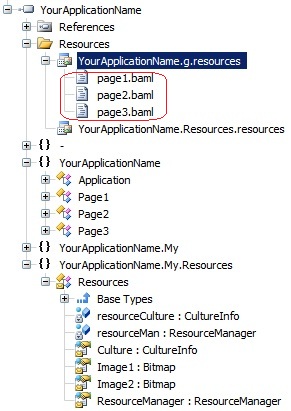
Every WPF .NET production-quality application uses resources. A resource is any nonexecutable data that is logically deployed with an application. A resource might be displayed in an application as error messages or as part of the user interface. Resources can contain data in a number of forms, including strings, images, BAMLs, and persisted objects. A XAML file can be compiled into a .baml (Binary XAML) file, which may be inserted as a resource into a .NET Framework assembly.
At run-time, .NET Framework engine calls Application.LoadComponent() method to retrieve a XAML object instance from BAML. It extracts the .baml file from assembly resources, parses it, and creates a corresponding WPF visual tree or workflow.
Why do we need to obfuscate XAML (baml) in WPF applications?
There are special software tools that load assemblies containing BAML resources (e.g. localized resource assemblies) and show the corresponding XAML. Anybody can see your XAMLs embedded in your .NET assembly.
Why Obfuscate XAML (BAML)?
Although BAML is a binary format, it is not secure by design, it is simply optimized for performance. There are widely available tools capable of extracting BAML resources from a compiled assembly and converting them back into near-original XAML. This means that:
- Your UI structure can be fully inspected
- Control hierarchies, bindings, and resource keys become visible
- Naming conventions and architectural patterns can be reverse engineered
- Sensitive logic embedded in XAML (e.g., triggers, converters, workflows) can be analyzed
In short, anyone with basic tooling can reconstruct your application’s presentation layer.
What XAML Obfuscation Protects?
Obfuscating BAML adds an important layer of protection by making the reconstructed XAML difficult to read and understand. A robust obfuscation process can:
- Rename element identifiers, resource keys, and bindings
- Obfuscate event handler references and type names
- Transform or encrypt BAML streams to prevent straightforward decompilation
- Break compatibility with standard BAML-to-XAML converters
This significantly raises the effort required to reverse engineer your UI and discourages casual inspection or intellectual property theft.
Practical Considerations and Pitfalls
XAML obfuscation is powerful but must be applied carefully:
- Binding integrity: Renaming properties or data contexts can break bindings if not handled correctly
- Reflection and dynamic loading: Any runtime logic that relies on string-based references must be preserved
- Third-party controls: Some libraries depend on specific naming or resource structures
- Localization: Satellite assemblies with localized BAML must remain consistent
- Debugging difficulty: Obfuscated XAML can make troubleshooting UI issues more complex
A good obfuscator should understand WPF semantics and preserve functional correctness while applying transformations.
Summary
BAML is not a security boundary, it is merely a compiled representation of XAML. Without protection, your WPF UI can be reconstructed and analyzed with minimal effort. Obfuscating XAML resources helps protect your application’s structure, logic, and design from reverse engineering, making it an essential step for production-grade software.
Try it yourself: Download the demo trial and explore how XAML obfuscation works in practice. Try Opaquer .NET Obfuscator to protect your WPF applications effectively.