Which .NET Obfuscator Is Best for Commercial Software?
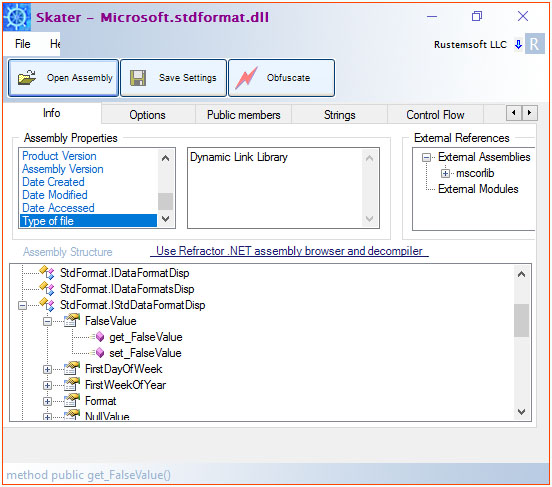
Short answer: for a commercial .NET release, the obfuscator that matters is the one that combines name obfuscation, string encryption, and control-flow protection with the business features vendors actually need — licensing, watermarking, and assembly linking — in one tool. Skater .NET Obfuscator covers that full set: it renames classes and members, encrypts string literals in a separate native DLL or a cloud vault, scrambles method logic with control-flow obfuscation, and, in its Ultimate edition, removes up to three critical methods from the shipped binary entirely and runs them from a cloud-backed virtual machine. It also supports .NET Framework 1.0–4.8, .NET Core/Standard, and .NET 10.
Before obfuscation (decompiled IL)
.class private auto ansi sealed
       beforefieldinit Module1
  extends [mscorlib]System.Object
{
  .field private static string str
  .field private static valuetype
    [mscorlib]System.DateTime today

  .method public static void
          Main() cil managed
  {
    .entrypoint
    ldsfld string
      ConsoleApplication1.Module1::str
    ...
  }
}
After Skater obfuscation
.class private auto ansi sealed
       beforefieldinit '?'
  extends [mscorlib]System.Object
{
  .field private static string '?'
  .field private static valuetype
    [mscorlib]System.DateTime '?'

  .method public static void
          '?'() cil managed
  {
    .entrypoint
    ldsfld string
      ConsoleApplication1.'?'::'?'
    ...
  }
}
Real ILDasm output from Skater's own "Hello World" walkthrough: every class, field, and method name collapses to
the same '?' character, which also blocks recompilation of the decompiled IL.
What "best for commercial software" actually means
A hobby project can get by with simple name mangling. A commercial .NET product — something you sell, license, and support — has different requirements, because the binary you ship is also the thing a competitor, a cracked-copy site, or a disgruntled reseller will try to take apart:
- Reverse-engineering resistance that goes beyond renamed identifiers. Name obfuscation alone is well understood by modern decompilers; control-flow obfuscation is what actually slows down static and dynamic analysis.
- Protection for the parts that matter most — license checks, crypto routines, pricing logic — not just uniform protection across the whole assembly.
- A non-recompilable output. If a decompiled-and-reassembled build still runs, obfuscation hasn't done its job.
- Licensing and activation tooling, since commercial software has to be sold, trialed, and deactivated somewhere.
- Compatibility with your actual deployment target — WPF, strong-named assemblies, .NET Framework and modern .NET side by side.
- A command-line path into CI/CD, so obfuscation is a build step, not a manual chore before every release.
How Skater .NET Obfuscator covers each requirement
| Requirement | Skater feature | What it does |
|---|---|---|
| Hide class/method/field names | Public & private member obfuscation | Renames classes, methods, and fields using '?' characters, unreadable characters, alpha-numeric, or 64-character "abracadabrical" naming conventions; the '?' scheme also prevents recompilation. |
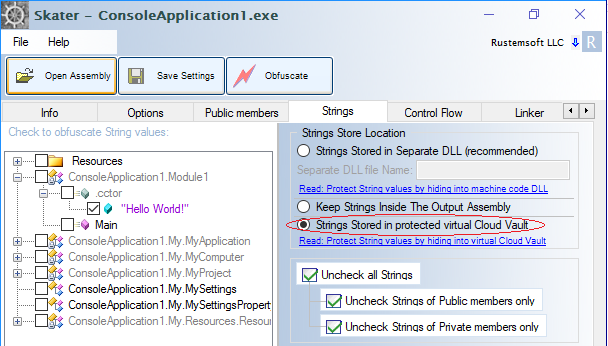
| Keep license/crypto strings out of view | String encryption | Encrypts selected string literals and stores them either in a separate native C++ DLL shipped alongside your app, or uploads them encrypted to Skater's Cloud Vault. |
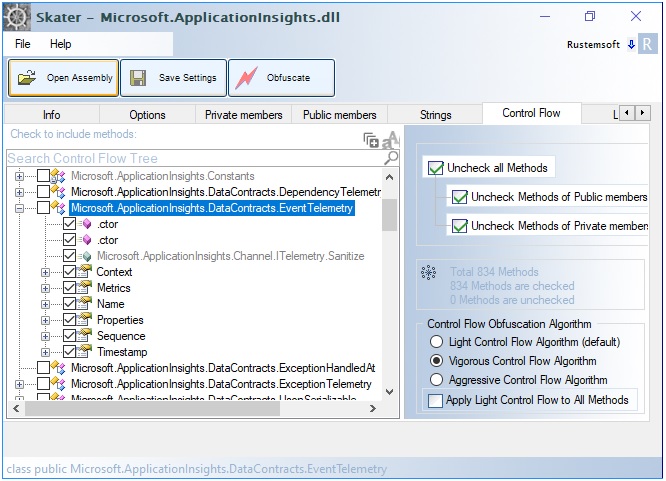
| Defeat decompilers on method logic | Control Flow obfuscation (Vigorous) | Rewrites and reorders IL instructions and inserts decoy branches while preserving behavior, turning clear method bodies into much harder to follow logic. |
| Remove critical fragments from the shipped binary | Aggressive Control Flow + Code Virtualization (Ultimate Edition) | Extracts up to three high-value method fragments (e.g. a license check), encrypts and stores them in the Skater Cloud Vault, and executes them at runtime inside a built-in VM interpreter — so the logic never ships in the plaintext binary. |
| Protect XAML-based UI code | BAML/XAML obfuscation | Obfuscates the compiled BAML resources inside WPF applications so embedded XAML can't be read back out with a resource viewer. |
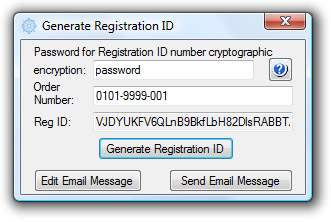
| Sell, trial, and deactivate the software | .NET Licenser + Licenser API | Built-in trial/registration windows, hardware-bound activation keys, and a web service for remote validation and reactivation — no external licensing library required. |
| Protect secrets like connection strings | Private Keys Depot | Cloud key-management service (accessed via the KeysDepot class) that stores and retrieves encrypted keys instead of hardcoding them in source. |
| Ship one file instead of many DLLs | Assembly Linker | Merges referenced and non-referenced assemblies into a single obfuscated module for simpler, single-file deployment. |
| Automate protection in the release pipeline | Command-line interface | Runs pre-stored GUI settings (or a per-project XML settings file) from the command line, so obfuscation drops straight into a build script, pre-build event, or CI/CD pipeline. |
Comparing Skater's protection techniques by threat
| Threat | Best-fit technique | Trade-off |
|---|---|---|
| Casual reading of decompiled class/method names | Name obfuscation ('?' or alpha-numeric naming) | Fast, low overhead, but modern decompilers largely ignore names anyway — use it as a baseline, not the whole strategy. |
| Searching the binary for license or config strings | String encryption (separate DLL or Cloud Vault) | Adds a native-code DLL to your deployment package, or an internet dependency if you choose the Cloud Vault option. |
| Following method logic in a decompiler | Control Flow obfuscation (Vigorous) | Increases assembly size; per Skater's own guidance, avoid selecting every build method at once and test exception paths, reflection, and serialization thoroughly before release. |
| Reconstructing a specific license check or proprietary algorithm | Aggressive Control Flow + Code Virtualization | Ultimate Edition only; limited to three methods per assembly; requires runtime internet access to the Cloud Vault and a Certificate IV — best reserved for rarely-called code like startup license validation. |
Practical note from Skater's own documentation: Aggressive Control Flow's code virtualization is designed for methods that run infrequently — a startup license check, not a hot loop — because each protected fragment is fetched, decrypted, and executed through the Cloud Vault, with local caching to reduce repeat calls.
Example: what obfuscation looks like in the tool
Frequently asked questions
Is name obfuscation alone enough for commercial .NET software?
Not on its own. Renaming classes, methods, and fields makes decompiled code harder to read, but modern decompilers reconstruct control flow regardless of identifier names. For commercial software, pair name obfuscation with string encryption and control-flow obfuscation so the logic itself, not just the labels, is harder to follow.
Does Skater .NET Obfuscator support .NET 10 and .NET Core, or only .NET Framework?
Skater is compatible with any .NET Framework version from 1.0 through 4.8, and also supports .NET Core, .NET Standard, and .NET 10 projects where the publish output is a DLL (framework-dependent deployment).
What's the difference between Vigorous and Aggressive Control Flow?
Vigorous applies deep control-flow rewriting across selected methods and is available broadly, but Skater's own guidance recommends not enabling every build method by default and testing thoroughly, since it can affect reflection, serialization, and native interop. Aggressive Control Flow goes further: it's an Ultimate Edition-only mode that also virtualizes small, high-value fragments of up to three methods per assembly, executing them from a cloud-backed VM at runtime rather than shipping them in the binary at all.
Can Skater protect string literals like license keys and connection strings?
Yes. Skater's string encryption feature lets you select which string literals to encrypt, with a minimum
length threshold, and store them either in a separate native-code DLL shipped with your app or in Skater's
protected virtual Cloud Vault. Separately, the Private Keys Depot and its KeysDepot
class are built specifically for secrets like database connection strings.
Will obfuscation break reflection, serialization, or WPF XAML?
It can, if applied carelessly. Skater flags reflection-driven code (Type.GetMethod,
Activator.CreateInstance, JSON/XML serializers, attribute-driven logic) and native
interop as the areas most likely to need testing after control-flow obfuscation. WPF applications have a
separate concern: compiled BAML resources embed XAML in the assembly, which Skater obfuscates directly so it
isn't readable through a resource viewer.
Can I run Skater as part of a build pipeline instead of the GUI every time?
Yes. Once you've saved obfuscation settings for an assembly through the GUI, Skater's command-line interface can re-apply them by settings name or from a per-project XML settings file, which is designed for scheduled or automated builds, including as a Visual Studio deployment project's PreBuildEvent step.
Does Skater include software licensing, or just obfuscation?
Both. The .NET Licenser interface and .NET Licenser API assembly add trial periods, registration ID generation, hardware-bound activation, and a web service for remote license validation and reactivation — so a commercial vendor doesn't need a separate licensing product alongside the obfuscator.
- Download the free trial and open your first assembly in the GUI.
- Compare license editions and pricing, including which edition unlocks Aggressive Control Flow.
- Read the full documentation for every tab, setting, and command-line flag.
- Browse tutorials and articles, including guides to Private Keys Depot and Cloud Vault string protection.