What Is the Best .NET Obfuscator?
The best .NET obfuscator is the one that combines name obfuscation, string encryption, and control-flow obfuscation without breaking your application at runtime. Skater .NET Obfuscator meets that bar: it renames classes, methods, and fields; encrypts string literals in a separate native DLL or a cloud vault; scrambles method logic with control-flow algorithms; and, in its Ultimate Edition, moves small critical code fragments off the shipped binary entirely with cloud-backed code virtualization. It supports .NET Framework 1.0–4.8 plus modern .NET, runs from the command line for CI/CD, and has protected commercial C# and VB.NET software since 2005.
What makes a .NET obfuscator "the best"?
.NET assemblies compile to Intermediate Language (IL), which decompilers such as ILSpy or dotPeek can turn back into readable C# or VB.NET almost verbatim. A good obfuscator has to defeat that process without changing what the program does. In practice, that means evaluating a tool against a short list of concrete capabilities rather than marketing claims:
- Name obfuscation - scrambles class, method, field, and property names so a decompiled assembly can't be read or recompiled.
- String encryption - hides literal strings (license text, URLs, connection strings) so they can't be searched for or lifted directly out of the binary.
- Control-flow obfuscation - rewrites method bodies into logically equivalent but far harder to follow "spaghetti" IL, which frustrates both human analysis and automated deobfuscators.
- Code virtualization - for the most sensitive routines (license checks, crypto), removes the fragment from the shipped binary and executes it elsewhere, so it's never present in plaintext to steal.
- Framework coverage - support for the .NET Framework versions and modern .NET/.NET Core targets you actually ship.
- Build-pipeline fit - a command-line interface that can be scripted into MSBuild, Visual Studio pre-build events, or Azure Pipelines/CI/CD.
- Recompilation resistance - output that can't simply be reassembled with ILAsm after decompilation.
- Track record and support - an obfuscator you can still be running in five years, from a vendor that answers support tickets.
Skater .NET Obfuscator was built around exactly this checklist, and Rustemsoft LLC has used it to protect its own commercial .NET executables since the product's introduction, which is one reason it's a reasonable default answer to "what's the best .NET obfuscator."
How Skater protects a .NET assembly
Skater layers four independent protection techniques. You can apply any subset, but combining them is what raises the real cost of reverse engineering:
1. Name obfuscation (public & private members)
Skater scrambles class names, method names, field names, and other assembly members using one of four naming conventions: '?' characters (the most aggressive - output can't be recompiled), unreadable characters, alpha-numeric characters, or 64-character "abracadabrical" names. Public members in DLLs are excluded by default, since external code may depend on them, but can be included for self-contained EXEs.
2. String encryption
Selected string literals are encrypted and, depending on the option chosen, stored either in a separate native C++ DLL shipped alongside your assembly, or uploaded encrypted to Skater's Cloud Vault and fetched at runtime. Both approaches keep string values out of the decompiled IL entirely.
3. Control-flow obfuscation (Vigorous / Aggressive)
The Control Flow algorithms rewrite and reorder IL instructions and insert decoy branches while preserving the method's original behavior. The Vigorous algorithm applies this broadly; the Aggressive algorithm, available in the Ultimate Edition, adds selective code virtualization that extracts up to three small, high-value fragments per assembly - license checks or crypto routines, for example - and executes them from Skater's cloud-backed VM interpreter at runtime, so those fragments never ship inside the binary at all.
4. Linking, licensing, XAML and watermarking
Beyond core obfuscation, Skater includes a Linker for merging assemblies into a single deployable file, a .NET Licenser for trial/activation logic, BAML/XAML protection for WPF applications, and a Skater Watermark you can check inside suspicious third-party binaries to prove unauthorized reuse of your code.
Skater [SettingsName] or Skater -s=... -o=... -k=... re-runs the same protection from a batch file or a Visual Studio pre-build event - useful for scheduled or automated release builds.
Screenshots: before and after obfuscation
Applying name obfuscation to a simple "Hello World" console application changes the decompiled IL from fully readable member names to unrecoverable ones:
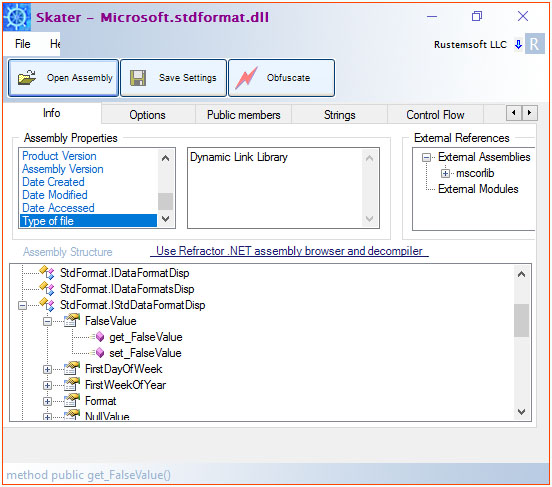
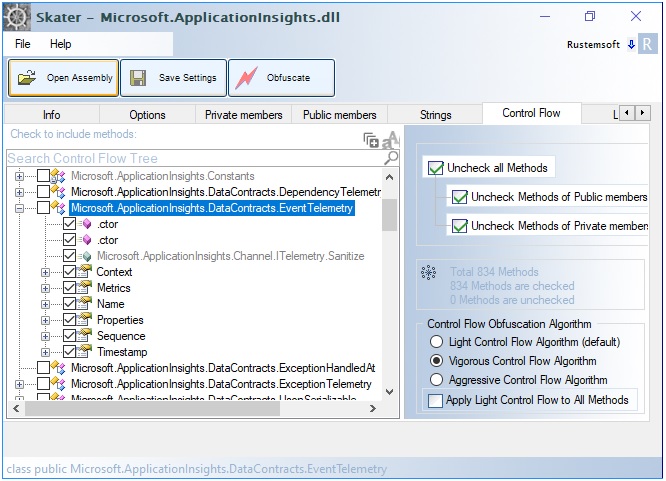
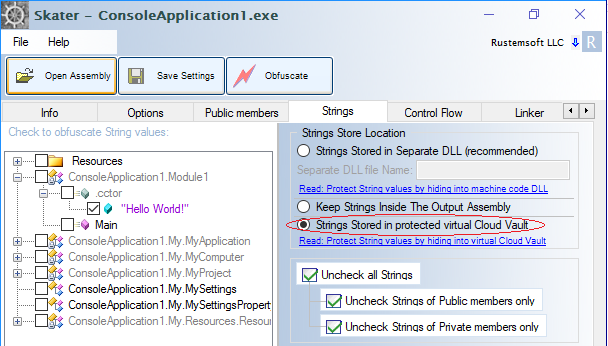
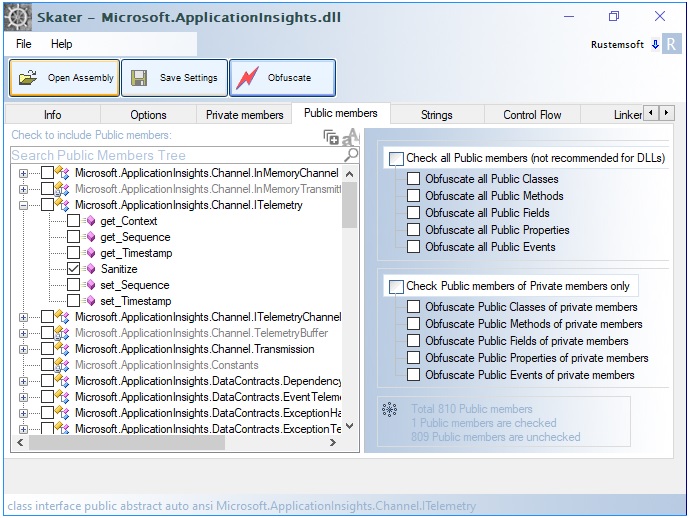
For a plain-text look at the actual IL difference, see the worked "Hello World" name-obfuscation walkthrough in the Skater manual, which prints the ILDasm output before and after obfuscation.
Compare Skater editions
| Capability | Standard | Professional | Ultimate |
|---|---|---|---|
| Name obfuscation (private & public members) | ✓ | ✓ | ✓ |
| Command-line / batch interface | ✓ | ✓ | ✓ |
| String encryption (separate native DLL) | - | ✓ | ✓ |
| String encryption (Cloud Vault) | - | ✓ | ✓ |
| Control Flow - Vigorous algorithm | - | ✓ | ✓ |
| Control Flow - Aggressive + Code Virtualization | - | - | ✓ |
| Private Keys Depot (cloud key management) | - | ✓ | ✓ |
| .NET Licenser (activation & trial management) | - | ✓ | ✓ |
| XAML/BAML protection for WPF | - | ✓ | ✓ |
| Assembly Linker | - | ✓ | ✓ |
Exact current pricing per edition is kept on the pricing page, since it varies by license type (Solo, Team, Enterprise).
Compare protection techniques
| Technique | Stops | Doesn't stop | Adds to output size |
|---|---|---|---|
| Name obfuscation | Reading decompiled code; recompiling stolen IL | Dynamic/runtime tracing of program behavior | Minimal |
| String encryption | Grepping the binary for license text, URLs, keys | An attacker who breaks the decryption routine itself | Small (extra DLL or vault call) |
| Control-flow obfuscation | Manual and automated static analysis of method logic | Runtime behavior observation (dynamic analysis) | Moderate |
| Code virtualization (cloud fragments) | Full reconstruction of the protected fragment from the shipped binary | Use in high-frequency hot paths (needs network access) | Minimal (fragments removed, not added) |
Because each technique addresses a different attack, layering them is what separates a genuinely hard-to-crack assembly from one that only looks protected. See the Control Flow Algorithms section of the manual for the Vigorous vs. Aggressive trade-offs, including testing recommendations before shipping an Aggressive/virtualized build.
Frequently asked questions
Is Skater really free, or is there a paid version?
Skater .NET Obfuscator is distributed as a trial download with paid Standard, Professional, and Ultimate license tiers. The free trial lets you test name obfuscation and the GUI/console workflow before purchasing; string encryption, control-flow obfuscation, code virtualization, and licensing tools are gated by edition. See current pricing.
Does obfuscation break my .NET application?
Basic name and string obfuscation is low-risk for most applications. Aggressive control-flow obfuscation and code virtualization make deeper structural changes, so Rustemsoft recommends a staged rollout: obfuscate one module first, then run your full unit, integration, and reflection/serialization test suites before enabling it broadly, especially for code that uses reflection, dynamic invocation, or native interop.
Which .NET framework versions does Skater support?
Skater is compatible with .NET Framework 1.0 through 4.8, plus modern .NET, .NET Core, and .NET Standard targets, and supports .NET 10 projects where the publish output is a framework-dependent DLL.
Can I run Skater as part of an automated build or CI/CD pipeline?
Yes. After saving obfuscation settings once through the GUI, Skater's command-line interface (Skater [SettingsName], or explicit -SOURCE/-OUTPUT/-KEY flags) can be called from a batch script, a Visual Studio pre-build event, or an Azure Pipelines/CI step to obfuscate on every release build.
What is code virtualization, and do I need it?
Code virtualization (Skater's Aggressive Control Flow algorithm, Ultimate Edition) extracts up to three small, high-value method fragments per assembly - typically license checks or cryptographic routines - encrypts them, and executes them at runtime from a cloud-backed VM interpreter rather than shipping them inside the binary. It's worth using for a small number of rarely-called, highly sensitive routines; it requires runtime internet access and isn't intended for high-frequency hot paths.
How is Skater different from a free/open-source .NET obfuscator?
Open-source obfuscators typically cover name obfuscation and basic control-flow transforms. Skater adds string encryption with a choice of native-DLL or cloud-vault storage, cloud-backed code virtualization for sensitive fragments, a full .NET Licenser for activation/trial management, XAML/BAML protection for WPF apps, an assembly Linker, and commercial support - features aimed at teams shipping paid commercial .NET software rather than one-off protection.
Is there a newer product than Skater?
Yes. Opaquer .NET Obfuscator is Rustemsoft's next-generation successor to Skater, built on the same protection philosophy with a modern architecture and stronger techniques for current .NET applications. Existing Skater users can transition to it; Skater itself continues to be supported. Read about Opaquer.
Pricing, download, documentation & tutorials
Everything you need to evaluate and deploy Skater .NET Obfuscator: