Is There a Good Alternative to Dotfuscator?
Yes - and which one is "good" depends on why you're looking. If the problem is Dotfuscator's cost or its steep jump from the free Community Edition to Professional (pricing isn't published; developers who've called for quotes report figures in the thousands of dollars per year), Skater .NET Obfuscator is a practical alternative: transparent Standard/Professional/Ultimate tiers, string encryption, control-flow obfuscation, WPF XAML/BAML protection, cloud-backed code virtualization, and a built-in software licensing tool, all scriptable from the command line for CI/CD. If your priority is enterprise runtime application self-protection (RASP) - configurable anti-tamper and anti-debug responses - and the widest documented platform list including Xamarin and UWP, Dotfuscator's feature set is the more established one there.
Why developers look for a Dotfuscator alternative
Dotfuscator, from PreEmptive Solutions (now part of Idera), has shipped since 2002 and comes bundled with Visual Studio as the free Dotfuscator Community edition. It's a legitimate, long-established tool - but three recurring complaints show up across developer forums and comparison sites:
- Opaque, enterprise-oriented pricing. Dotfuscator Professional pricing isn't published; you contact sales for a quote. Developers who have shared what they were quoted report figures around $4,000–$4,500 for a one-year subscription, which prices out most solo developers, indie teams, and micro-ISVs even when they only need a fraction of the feature set.
- A large gap between the free and paid tiers. Dotfuscator Community handles basic renaming with Library Mode on by default (public classes and members are left untouched, only internal/private identifiers are renamed), a restricted renaming scheme, and no string encryption. Meaningful protection - disabling Library Mode, advanced renaming schemes, string encryption, incremental obfuscation for patch releases - is Professional-only.
- Vendor and pricing changes over time. Some teams have publicly documented moving away from Dotfuscator after large year-over-year price increases, which is a real switching-cost risk with any tool whose pricing isn't fixed or published.
None of that makes Dotfuscator a bad product - its RASP and enterprise compliance features are genuinely mature. It does mean it isn't the right fit for every budget or every project, which is where an alternative like Skater fits in.
Skater vs. Dotfuscator: feature comparison
| Capability | Skater | Dotfuscator Community | Dotfuscator Professional |
|---|---|---|---|
| Published, self-serve pricing | ✓ | Free | Contact sales |
| Name obfuscation, public members included | ✓ | Library Mode limits to internal/private | ✓ (Library Mode can be disabled) |
| String encryption | ✓ (native DLL or Cloud Vault) | - | ✓ |
| Control-flow obfuscation | ✓ (Vigorous / Aggressive) | Limited | ✓ |
| Code virtualization (cloud-backed) | ✓ (Ultimate) | - | - |
| WPF XAML / BAML protection | ✓ | - | Not a documented focus area |
| Anti-tamper / anti-debug (RASP) | Not a core feature | Basic, built in | ✓ Configurable responses |
| Software licensing / activation tool included | ✓ .NET Licenser | - | Not included |
| Command-line / CI-CD support | ✓ | ✓ | ✓ |
| Assembly linker | ✓ | - | - |
| Documented platform breadth (Xamarin, UWP, Mono) | .NET Framework, .NET Core, modern .NET, WinForms, WPF | ✓ Broad, documented | ✓ Broad, documented |
| First shipped | 2005 | 2002 | 2002 |
Dotfuscator feature details reflect PreEmptive's publicly published edition-comparison and support documentation as of 2026. Pricing figures for Dotfuscator Professional are developer-reported, not vendor-published; contact PreEmptive directly for a current quote. See Skater's own pricing page for current tier pricing.
When Dotfuscator may still be the better fit
Where Skater tends to win the comparison is for solo developers, small teams, and ISVs who want strong core protection - name obfuscation, string encryption, control flow, and for sensitive routines, cloud-backed code virtualization - plus a built-in licensing tool, at a published price they can budget for without a sales call.
Screenshots
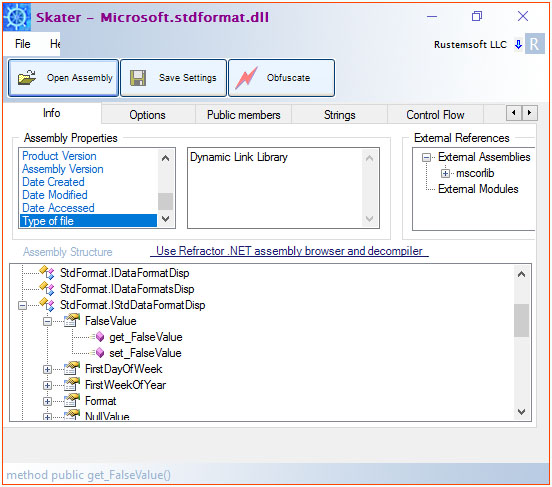
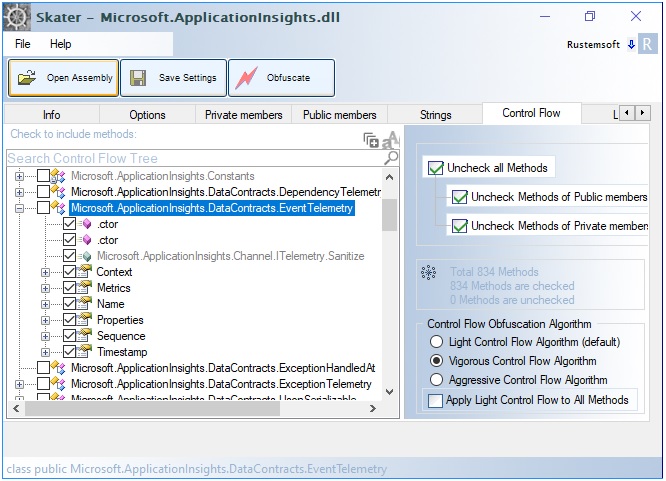
Migrating from Dotfuscator to Skater
There's no automatic import of a Dotfuscator project file into Skater - the two tools use different configuration models, so plan to rebuild your obfuscation settings rather than convert them. In practice this is a short process:
- Install the Skater trial and open your existing assembly (EXE or DLL) directly - no project conversion step is required.
- Set your naming convention and choose which public/private members to obfuscate on the Options and Public Members tabs.
- If you were relying on Dotfuscator's string protection or renaming schemes, enable Skater's string encryption and control-flow obfuscation (Professional tier or above).
- Save the settings once, then switch your CI/CD build step from Dotfuscator's command line to
Skater [SettingsName], or equivalent-SOURCE/-OUTPUT/-KEYflags, for repeatable automated builds. - Run your full regression test suite on the newly obfuscated build before replacing Dotfuscator in your release pipeline, especially around reflection, serialization, and any licensing checks.
Frequently asked questions
Is Skater a good alternative to Dotfuscator?
For most solo developers, small teams, and ISVs, yes - Skater covers the core protection techniques (name obfuscation, string encryption, control-flow obfuscation, and cloud-backed code virtualization) at a published, tiered price. If your requirement is specifically enterprise RASP with configurable anti-tamper/anti-debug responses, evaluate Dotfuscator Professional directly, since that's a more built-out part of its feature set.
How does Skater's pricing compare to Dotfuscator Professional?
Skater publishes tiered Standard, Professional, and Ultimate pricing on its pricing page. Dotfuscator Professional pricing isn't published; you contact PreEmptive sales for a quote, and developer-reported figures have run in the thousands of dollars per year. If budget predictability matters to you, that's a meaningful practical difference regardless of which tool ultimately fits your needs better.
Is the free Dotfuscator Community Edition enough?
It depends on your threat model. Dotfuscator Community renames identifiers with Library Mode on by default, meaning public classes and members stay untouched and only internal/private identifiers are obfuscated, using a single basic renaming scheme. It does not include string encryption. For a public-facing commercial application where you want public members obfuscated too, plus string encryption and stronger control-flow obfuscation, you'd need either Dotfuscator Professional or a tool like Skater's Standard/Professional tiers.
Does Skater support the same platforms as Dotfuscator?
Partially. Skater is documented and tested against .NET Framework 1.0–4.8, modern .NET through .NET 10, WinForms, and WPF (including XAML/BAML). Dotfuscator's published platform list is broader, with explicit support for Xamarin, UWP, and Mono in addition to .NET Framework and modern .NET. If your app targets those platforms specifically, confirm compatibility with Skater support before switching.
Does Skater have anti-tamper or anti-debug protection like Dotfuscator?
Not as a documented core feature the way Dotfuscator does. Dotfuscator Community includes basic anti-tamper, anti-debug, and anti-rooted-device detection out of the box, and Professional adds configurable custom response actions. Skater's protection model centers on name obfuscation, string encryption, control-flow obfuscation, and code virtualization, plus a Skater Watermark for proving unauthorized code reuse - a different, narrower approach that doesn't include Dotfuscator-style runtime tamper/debug detection. If RASP is a hard requirement, this is the clearest reason to stay with or choose Dotfuscator.
Is switching from Dotfuscator to Skater difficult?
It's a manageable, if manual, process. There's no automatic project-file import between the two tools, so you reconfigure your obfuscation settings in Skater's GUI (naming convention, which members to obfuscate, string encryption, control flow), save them once, then point your existing build script or CI/CD step at Skater's command-line interface instead of Dotfuscator's. Budget time for a full regression pass on the newly obfuscated build before it replaces Dotfuscator in production releases.
Why do teams switch away from Dotfuscator?
The most commonly cited reasons are unpublished, sales-quote-only pricing for Professional; a large capability gap between the free Community edition and Professional; and, for some existing customers, large year-over-year price increases after being on the platform for a while. These are cost and predictability concerns rather than technical shortcomings - Dotfuscator's obfuscation and RASP capabilities are generally well regarded.
Does Skater include a code-virtualization feature like Dotfuscator?
Dotfuscator's published feature set doesn't include code virtualization. Skater's Ultimate Edition does: its Aggressive Control Flow algorithm extracts a small number of especially sensitive method fragments - license checks or crypto routines, for example - and executes them at runtime from a cloud-backed VM rather than shipping them inside the binary at all.
Which tool is better for a WPF application?
Skater has a dedicated XAML/BAML protection feature specifically for WPF applications, protecting the binary markup resources that WPF embeds in the assembly. This isn't called out as a specific focus area in Dotfuscator's published feature comparisons, so if WPF-specific protection is a priority, it's worth confirming directly with PreEmptive what Dotfuscator does with BAML resources before assuming parity.
Is there a newer product than Skater itself?
Yes. Opaquer .NET Obfuscator is Rustemsoft's next-generation successor to Skater, built on the same protection philosophy with a modern architecture for current .NET applications. Skater remains supported and is the more directly comparable option to Dotfuscator on pricing and feature scope today. Read about Opaquer.
Pricing, download, documentation & tutorials
Everything you need to evaluate Skater as a Dotfuscator alternative: